
Leganto January 2026 Release Notes
February 2026 Sneak Preview
-
Behind-the-scenes work to address reading list items linked to removed e-resources (LENH-I-6031)
Main Features
Set "No List Expected" in Bulk Using Course Bulk Update Task
January 2026 Fulfillment and Resource Sharing  Idea Exchange URM-240421
The Course Bulk Update job (Admin > Run a Job > Courses > Course Bulk Update) now supports the No list expected attribute. Staff can select the No list expected checkbox in the job and choose either Add No list expected or Remove No list expected for all courses in the selected set, which enables efficient large-scale updates.

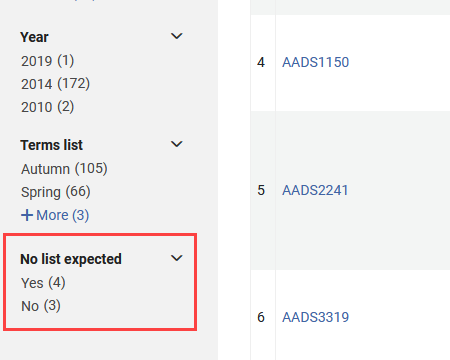
A new No list expected facet is also available on the Fulfillment > Courses page. It enables staff to filter courses based on whether the No list expected attribute is selected (Yes) or not selected (No). This enhancement improves course management by enabling institutions to quickly identify and organize courses that are intentionally not expected to have lists.
Course Material Visibility in Rialto
January 2026 Leganto NGS-13877
There is now a deeper integration between Rialto and Leganto that provides greater visibility into course-related materials during marketplace searching and selection. Rialto now includes course information for book citations with ISBNs that are associated with current and future courses. This data is updated on a weekly basis.
Two new filters are available in Rialto's advanced search for institutions that use Leganto:
- Reading List Course Dates (Current and Future) — This filter limits results to titles that appear on either active or upcoming Leganto courses.
- Reading List Tags— This filter enables libraries to refine results based on tags applied in Leganto. Institutions define these tags themselves.

Titles that appear on Leganto reading lists display a Course Material badge in Rialto at both the work and offer levels. The badge indicates that the title is required or recommended for one or more current or future courses. Hovering over the badge displays the associated course codes.


When an item associated with a Leganto reading list is added to a Rialto cart, citations with a matching ISBN are linked to the newly acquired inventory. Citation alerts and statuses are updated as the order progresses, based on the rialto_purchase_complete parameter (Configuration > Leganto > List Management > Course Reserves Automatic Statuses). Institutions can also configure whether citations with equivalent ISBNs (such as different formats or editions of the same book) are eligible for linking with the allow_citation_link_for_alternate_isbn parameter (Configuration > Collection Development > General > Other Settings).
This enhancement strengthens coordination between Leganto course activity and Rialto acquisitions, supporting timely identification and fulfillment of course-driven materials. For a full overview of these functionalities, see Leganto Integration in the Rialto documentation.
Additional Enhancements
-
January 2026 Fulfillment and Resource Sharing URM-315436 Alma now records which user uploaded a file to a citation. When a file is uploaded, the system stores either the uploader username or, if the file was added by a job, the job ID.
In Alma, this information is visible in the File Upload component under the label Uploaded by. This information will be added to analytics in a future release

-
January 2026 Leganto URM-315184 Leganto now supports copying LTI links to use in Moodle when using Moodle 4.5. Moodle 4.5 no longer accepts the full launch URL. When instructors select Copy link to Moodle in the Share Link dialog in Leganto, Leganto now automatically copies only the required URL segment whenever the LMS is detected as Moodle 4.5 or later.
Additionally, the Moodle linking help page in the Share Link popup now redirects to updated documentation specifically for Moodle 4.5, ensuring institutions receive setup guidance appropriate for their LMS version.
This enhancement eliminates the need for instructors to manually edit URLs when creating shareable links in Moodle, thereby reducing setup errors and enabling a smoother workflow.
-
January 2026 Leganto URM-306092 Leganto now displays the original list name and the associated course code(s) on the Duplicate List screen. The course code has a Copy to Clipboard icon next to it, which makes it easy for instructors to reuse elements of the old code when searching for the new one.
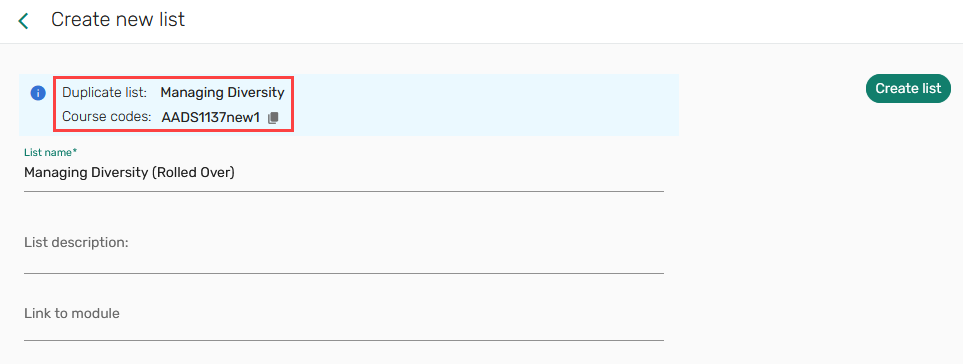
This improvement streamlines rollover workflows and reduces errors when linking lists to new course codes based on previous ones.
-
January 2026 Leganto URM-314959 The exit icon on the right pane, which opens when viewing or editing the full details of an item or when adding items, now displays the updated label Close pane (Esc) instead of Close pane.
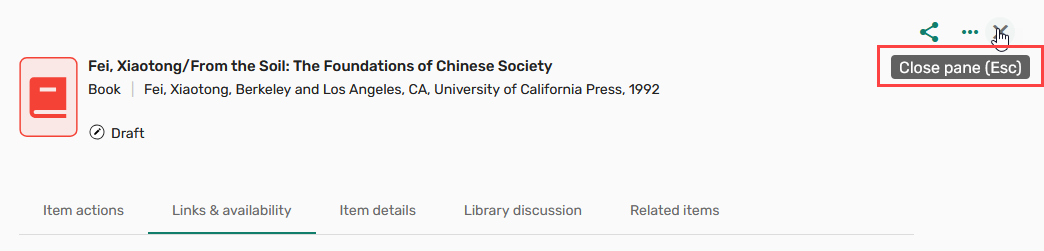
This enhancement provides clearer guidance for the available keyboard shortcut and supports quicker navigation back to the list.
-
January 2026 Analytics and Insights URM-317449 Previously, when users added an item through Cite it! and a matching record was located in the library repository, the citation origin in the analytics reports was set to repository. This prevented customers from seeing the true source of the added item.
Items added through Cite it! are now labeled with the origin CiteIt regardless of whether a matching repository record is found. This update enables more accurate analytics, helping institutions better track how items are added to reading lists.
-
January 2026 Analytics and Insights URM-316023 The default year for Leganto Usage Dashboard has been changed to 2025. This refers to the academic year.
-
January 2026 Leganto Several accessibility issues were resolved in January. The majority of these updates improved screen reader support by adding missing labels and correcting improper status announcements. Further accessibility enhancements were implemented in zoom functionality, color contrast, tab navigation, and focus order.
-
January 2026 Leganto URM-316495 Shareable links for courses now open on the My Lists tab instead of the List Catalog. As a result, instructors see the Create List button immediately after opening a link, enabling them to start a new list with the linked course preselected.
This update ensures that users land directly in the most relevant workspace, where they can view existing lists for the course and begin creating new ones without extra navigation.
-
January 2026 Leganto URM-316496 List headers now have a cleaner and more accessible visual layout. List titles now appear on the first row, while list information and links are grouped on a separate second row for improved clarity.
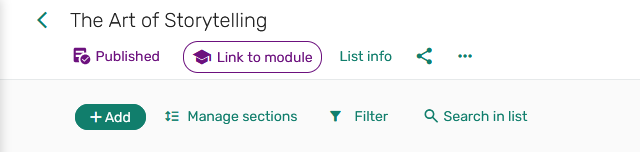
Additionally, list titles are now clickable and open the List Information panel. On hover, titles display a tooltip with the full list name. These refinements make it easier for users to navigate a list, access its details, and understand its content.
Resolved Issues
| SF number | Description |
|---|---|
| 08247449 URM-319387 | Approved digitization requests in Alma and Leganto were not displaying DCS links even after syncing. This was fixed so that once a digitization request is approved, the corresponding DCS link now appears correctly in both Alma and Leganto. |
| 08211752 URM-318705 | When searching under Lists Catalog, the item count for a list did not include notes, while the List Info field included them. This was fixed so that both item counts are now consistent, with notes included in the count in both the catalog search and the List Info. |
| 08191432 URM-318564 | When sorting a list by author in alphabetical order, items with only Additional Persons were incorrectly grouped separately from items that included an author. This caused all items with just Additional Persons to appear ahead of items with an author. This was fixed so that sorting now correctly considers both the Author and Additional Persons fields, producing the proper overall alphabetical order. |
| 08210155 URM-318390 | When running the Reading List Citation Update Task job on itemized sets, the number of errors shown in the summary sometimes did not match the errors listed in the detailed report. This was fixed so that the summary now accurately reflects the actual issues reported in the job details. |
| 08200902 URM-317780 | The Cite it! extension was not retrieving metadata correctly from The Open Textbook Library in Chrome and Firefox. This was fixed so that metadata from this supported site is now correctly retrieved. |
| 08193452 URM-317724 | The DRLS bibliographic mapping rules did not support the Original Thumbnail field. As a result, it was not possible to populate this field using a mapping rule. This was fixed so that the Original Thumbnail field is now correctly populated according to the mapping rule. |
| 08226079 URM-317412 | When using the Rialto search in Leganto, selecting More Details caused the availability to hang indefinitely. This was fixed so that the availability now loads correctly and displays the expected information for items retrieved via Rialto. |
| 07136235, 07159801, 07254940 URM-222561 | Dragging and dropping items between sections did not always work as expected. Items could only be moved to the next section, and attempts to drag over multiple sections would fail unless the intermediate section contained other items. This was fixed so that citations can now be dragged and dropped freely between any sections. |
